

Auto-detection
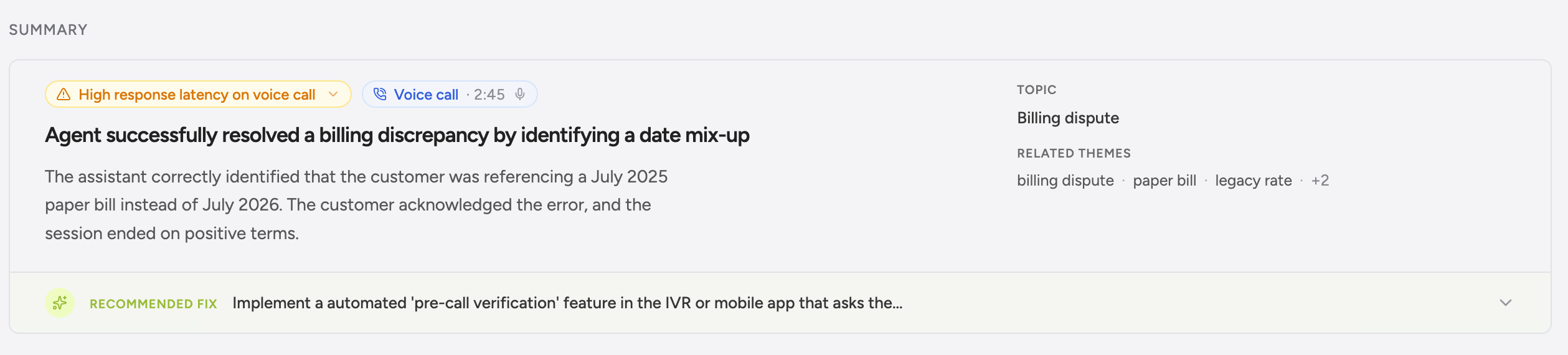
You don’t have to flag a conversation as “voice” or change anything about how you log. Greenflash looks at the transcript shape and per-turn timestamps, and if it looks like a voice call, the voice analyzers run. Already-instrumented conversations pick up voice analytics retroactively, no backfill. What this means in practice:- If you already POST to
/v1/messageswith per-turn timing, voice analytics is already running on those calls. - If you use Vapi, Retell, ElevenLabs, Bland, Synthflow, or Simple.ai, point the provider’s webhook at us and the rest is automatic.
- If you’re on something custom (LiveKit, Pipecat, OpenAI Realtime, in-house infra), send the transcript and we’ll figure it out from there.
Canonical transcript shape
If you’re building an adapter, this is the shape to target. Per-turn timing is the only hard requirement; everything else upgrades the analytics you get back. Minimum (auto-detection fires, latency/interruption/silence analyzers run):startedAt is Unix epoch milliseconds. durationMs is how long that turn was spoken. Speaker comes from the standard message role ("user" / "assistant") — you don’t need a separate voice.speaker for chat-shaped transcripts.
Recommended (unlocks the full set of voice analyzers and timeline annotations):
At the conversation level, send a
voiceCall object with durationMs, endedReason, recordingUrl (see below), and latency aggregates if your platform exposes them. Full field reference is in the Public API schema.
Five voice analyzers
Five analyzers run on every voice conversation:
These are deterministic by design: same transcript in, same result out. We picked it that way so you can compare week-over-week numbers without worrying about LLM drift muddying the comparison. The only analyzer that calls an LLM is call-end, and only as a tiebreaker on cases the rules can’t decide.
Conversation pathologies (voice + text)
Three pathology detectors fire on every conversation, voice or text:- Clarification loops: the agent re-asks the same clarifying question across turns.
- Repeated information: the agent re-states context the user already gave.
- Agent monologue: long stretches of agent speech with no user input.
Voice Call section on conversation detail
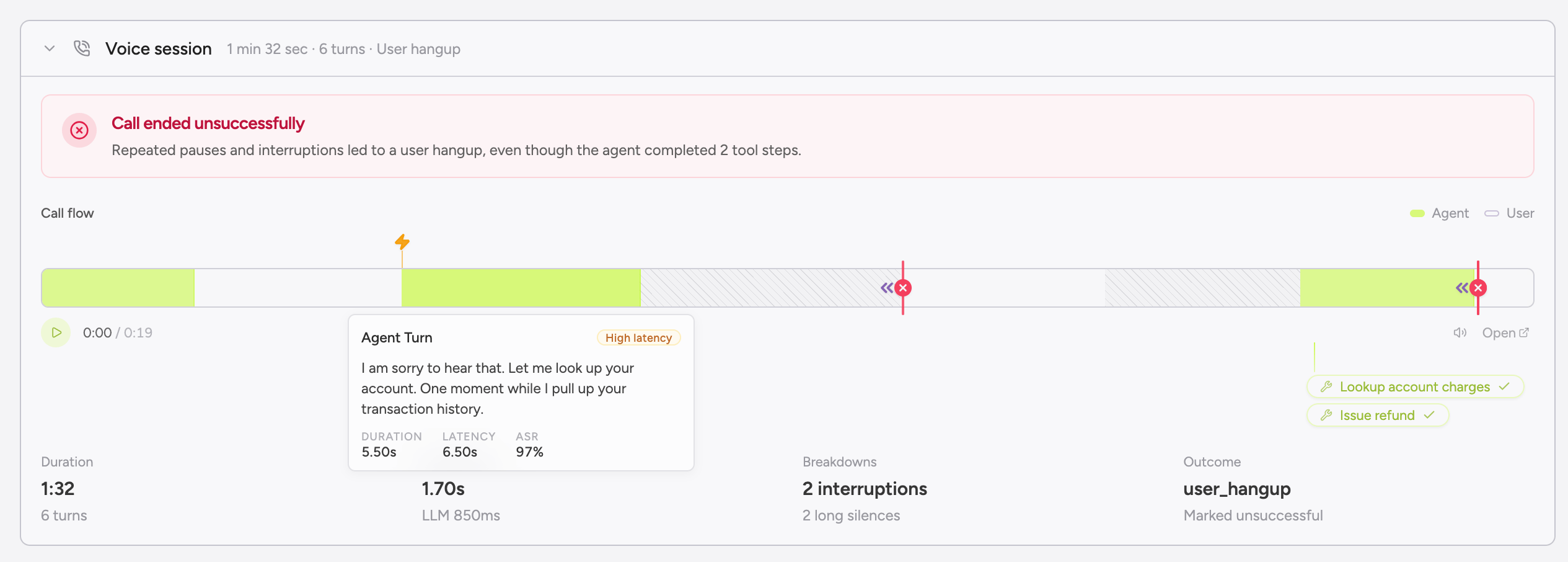
Open any voice conversation and the page renders a Voice Call section that’s auto-hidden for text. Two pieces share the surface, and it’s worth keeping them straight:- Call flow timeline (synthesized from the transcript). Per-turn bars colored by speaker, sized by duration, and marked with interruption and silence flags. Latency overlays (TTFA, ASR, LLM, TTS) sit on each turn. Greenflash draws this view from the per-turn timing on your messages — there’s no audio waveform involved, and it renders whether or not a recording exists.
- Audio player (the real recording). When
voiceCall.recordingUrlis set, an HTML<audio>element streams the file directly from your URL. When audio is loaded, the synthesized timeline above doubles as a scrubber and click-to-seek lights up; the playback head moves through the bars in lockstep with the audio. - Call-end classification. The analyzer’s label shown alongside the platform’s raw
endedReasonso you see both views side by side.
The voiceCall object
voiceCall is the conversation-level metadata block for voice calls — call duration, ended reason, latency aggregates, platform-supplied success, structured outputs, and the recording URL. It lives on the conversation alongside properties and is what the voice-aware UI keys off of.
The call flow timeline, latency annotations, interruptions, silences, and call-end classification are all reconstructed from the transcript and per-message voice timing — they render whether or not you ship a recording. The audio player is the only piece that depends on voiceCall.recordingUrl.
recordingUrl and audio playback
The audio player plays the actual recording from your provider or storage. It is not synthesized — there is no TTS step, and we don’t reconstruct audio from the transcript. Greenflash renders an <audio> element pointed at the URL you give us; the listener’s browser streams the bytes directly from your origin. We never download, proxy, transcode, or cache the file.
A few implications follow from that:
- The URL has to be publicly reachable from the listener’s browser. Signed URLs are fine, but they need to stay valid for as long as you want playback to work. If you expire or rotate them, the player will break for older calls.
- No URL means no audio and no scrubbing — but the synthesized flow still renders. The call flow timeline, per-turn latency overlays, interruption/silence flags, and call-end classification are all transcript-derived, so a call with no
recordingUrlstill shows the full Voice Call section. Click-to-seek and the playback head are the only things that go away. - Audio stays in your storage. Greenflash never copies the file. If the recording is deleted or the bucket goes away, playback goes with it; the transcript and analytics remain.
- Webhook integrations map this automatically. When you point Vapi, Retell, ElevenLabs, Bland, Synthflow, or Simple.ai at our webhook, the provider’s recording URL is forwarded into
voiceCall.recordingUrlfor you, so playback works as long as the provider’s hosted recording is reachable.
Webhook integrations
For the major voice platforms, paste a Greenflash URL into your provider’s webhook field and skip the SDK. Under the hood each one is just an adapter over/v1/messages, so you get the same auth, sampling, and analyses you’d get from the direct API.
Find your product UUID under Settings → Products in the Greenflash app, and add an
Authorization: Bearer gf_<your-api-key> header in the provider’s webhook config. That’s the whole setup.
Direct API option
For voice stacks not listed above (LiveKit, Pipecat, OpenAI Realtime, custom infra), POST directly to/v1/messages with voiceCall and per-message voice objects:
voiceCall and per-message voice is optional. Auto-detection still fires from per-turn timing alone.
Use cases
Diagnosing a latency regression
You switched LLMs last Tuesday and CSAT slipped this week. Open the product page and the Recent Regressions card surfaces a jump in voice latency p95. Click into the affected calls. The per-turn latency annotations show TTS quietly adding 400ms after the model swap. Roll back, and the regression resolves.Catching abandoned calls
Open the Call-end analyzer’s abandoned bucket and read three calls. Two of them show the same agent monologue at minute three: the prompt has the agent over-explaining before the user can confirm what they actually wanted. Tighten the prompt, abandoned-call rate drops.Comparing voice providers
Run the same prompt on Vapi and Retell for a week. Build a User Segment for each provider using conversation-property filters, then compare CQI, friction pillar scores, and voice latency p95 side by side. Now you can decide which one ships, with numbers.Next steps
Custom Analyses
Define guardrails that fire on voice signals: long silences, interruption clusters, unusual ended_reason patterns.
User Segments
Slice voice users by call success rate, sentiment trajectory, and call-end classification.
Linear
Push flagged voice conversations into Linear. The issue includes a deep link to the synced audio and timeline view.
Public API
Full schema reference for the canonical voice payload.