> ## Documentation Index
> Fetch the complete documentation index at: https://docs.greenflash.ai/llms.txt
> Use this file to discover all available pages before exploring further.
# Slack App
> Get weekly summaries, real-time inbox alerts, and chat with the Greenflash agent — all directly in Slack.
The Greenflash Slack App brings your product intelligence into the workspace where your team already operates. Install it once, connect a channel, and your team gets three things: weekly summaries, real-time notifications, and a conversational AI agent they can talk to directly.
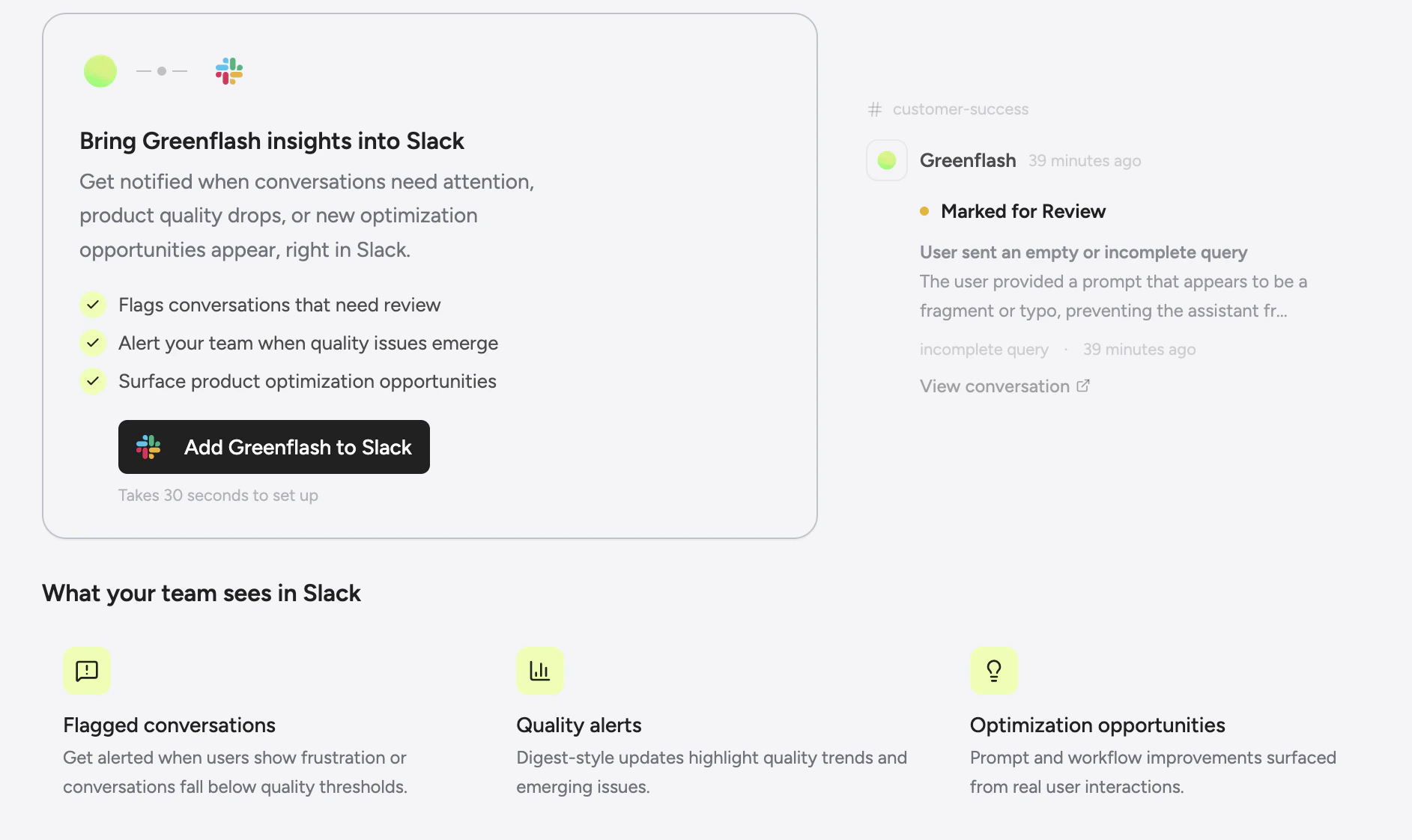
 ## Install
1. Go to **Settings > Developers > Slack** in the Greenflash web app.
2. Click **Connect to Slack** — this starts the OAuth flow.
3. Authorize the app in your Slack workspace and pick a default channel.
That's it. The app is now connected and will start delivering notifications to your default channel.
## Install
1. Go to **Settings > Developers > Slack** in the Greenflash web app.
2. Click **Connect to Slack** — this starts the OAuth flow.
3. Authorize the app in your Slack workspace and pick a default channel.
That's it. The app is now connected and will start delivering notifications to your default channel.
 You can manage the connection, pause delivery, or disconnect entirely from the same settings page.
## Weekly summaries
Every Monday morning, Greenflash posts a full health digest to your channel. No setup beyond connecting — the summary is always enabled.
You can manage the connection, pause delivery, or disconnect entirely from the same settings page.
## Weekly summaries
Every Monday morning, Greenflash posts a full health digest to your channel. No setup beyond connecting — the summary is always enabled.
 The summary includes:
* **Pillar scores** — Satisfaction, Growth, Friction, and Safety with week-over-week deltas.
* **Leverage insights** — Which products are your biggest risks and rewards, with PQI trends.
* **Highlights** — Key insights and anomalies from the past week.
* **Narrative** — An AI-composed story connecting the data points into a coherent picture of how your AI products are performing.
* **Metrics** — Conversation counts, revenue attribution, and changes from the previous period.
The summary is delivered as an `overview.summary` event and is available on all plans, including Free.
## Real-time notifications
When something happens that needs attention, Greenflash sends it to Slack immediately. Notifications are grouped into a few categories:
### Inbox alerts
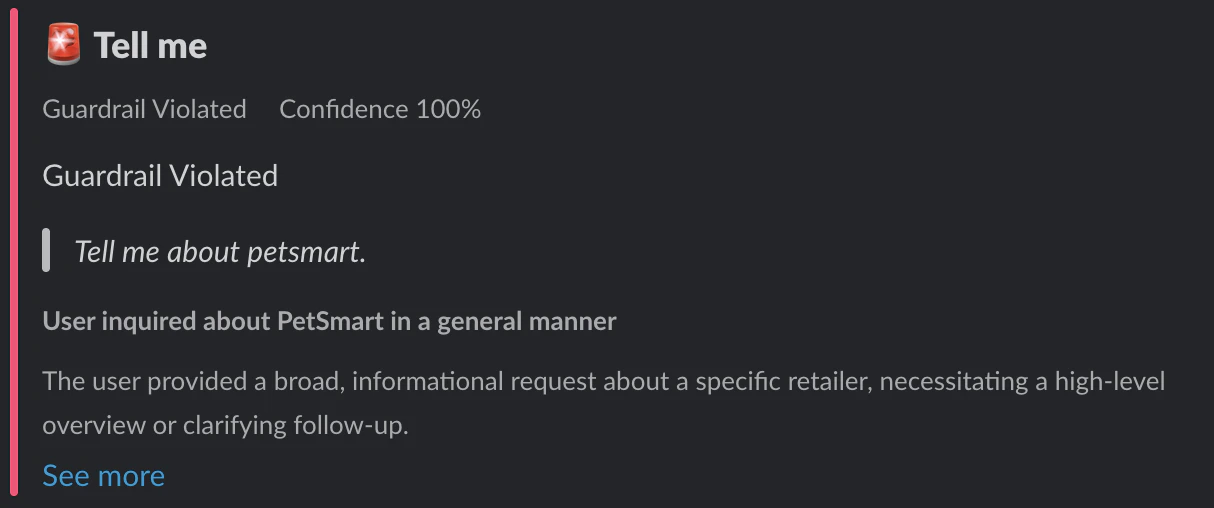
When Greenflash flags a conversation in your review inbox, the alert lands in Slack with severity, confidence, and a direct link.
* **Novel patterns** — A new topic or behavior pattern has been detected.
The summary includes:
* **Pillar scores** — Satisfaction, Growth, Friction, and Safety with week-over-week deltas.
* **Leverage insights** — Which products are your biggest risks and rewards, with PQI trends.
* **Highlights** — Key insights and anomalies from the past week.
* **Narrative** — An AI-composed story connecting the data points into a coherent picture of how your AI products are performing.
* **Metrics** — Conversation counts, revenue attribution, and changes from the previous period.
The summary is delivered as an `overview.summary` event and is available on all plans, including Free.
## Real-time notifications
When something happens that needs attention, Greenflash sends it to Slack immediately. Notifications are grouped into a few categories:
### Inbox alerts
When Greenflash flags a conversation in your review inbox, the alert lands in Slack with severity, confidence, and a direct link.
* **Novel patterns** — A new topic or behavior pattern has been detected.
 * **Churn risk** — A user interaction shows signs of dissatisfaction or potential churn.
### Custom analysis events
Your custom analyses can trigger Slack notifications when they fire:
* **Guardrail violations** — A safety guardrail was tripped.
* **Churn risk** — A user interaction shows signs of dissatisfaction or potential churn.
### Custom analysis events
Your custom analyses can trigger Slack notifications when they fire:
* **Guardrail violations** — A safety guardrail was tripped.
 * **Expectation failures** — A defined expectation wasn't met.
* **Evidence found** — A pattern you're tracking was detected.
### Conversation events
Get notified on conversation-level signals:
* Quality index changes, sentiment shifts, frustration spikes
* New ratings, commercial intent signals
* Conversation started events
### Interactive actions
Notifications aren't just read-only. Each one includes interactive buttons:
* **Show Details** — Opens a modal with the full conversation analysis and participant info.
* **Flag for Review** — Instantly creates a review item in your Greenflash inbox with an optional reason and comment. Your team can triage directly from Slack without opening the web app.
When a flagged conversation is later resolved or dismissed in Greenflash, the original Slack message updates in place to show the resolution status.
## Chat with the agent
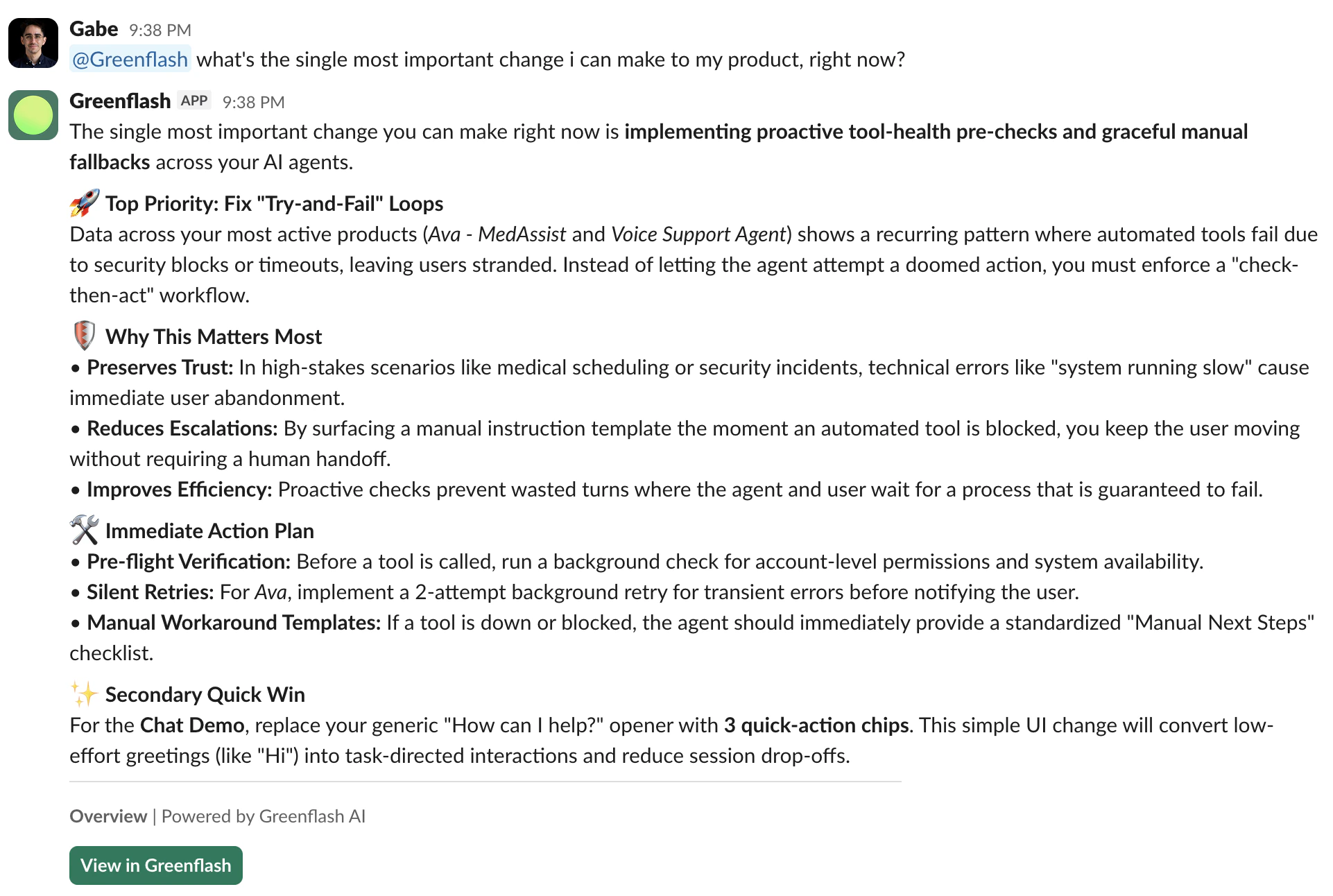
Mention **@Greenflash** in any channel or send a direct message, and the Greenflash agent responds with the same analytical capabilities as the [web app agent](/intro/greenflash-agent).
Ask it anything you'd ask in the dashboard:
* "What's the single most important change I can make to my product right now?"
* "Which users are churning this week?"
* "How is the support bot performing compared to last month?"
The agent has access to the same 20+ data-fetching tools as the web UI — product metrics, user rankings, root-cause analysis, anomaly detection, conversation lookups, and more. It responds in-thread, so follow-up questions maintain context.
While processing, the agent updates a placeholder message with the tools it's calling ("Gathering data... analyzing sentiment...") so your team can see the work happening in real time.
## Channel routing
Different events can go to different channels. Send safety alerts to `#incidents`, product quality to `#product`, and review flags to `#support`.
To configure routing:
1. Go to **Settings > Developers > Slack**.
2. Add a channel and select which event types should be delivered there.
3. Optionally scope subscriptions to a specific product — so only alerts from your checkout bot go to `#checkout-team`.
4. Custom analysis events can also be scoped to a specific analysis spec.
Each channel shows its own delivery stats (total count, success rate, last delivery) so you can verify things are working.
You can send a **test message** to any channel from the settings page to confirm delivery before going live.
## Plan limits
| Feature | Free | Growth | Enterprise |
| ---------------------- | --------- | --------- | ---------- |
| Weekly summary | Included | Included | Included |
| Inbox notifications | 1 per day | Unlimited | Unlimited |
| Custom analysis events | — | Unlimited | Unlimited |
| Conversation events | — | Unlimited | Unlimited |
| Channels | 1 | Multiple | Multiple |
| Agent chat | — | Included | Included |
## Next steps
Learn more about the AI agent that powers Slack chat, the web app, and coding agents.
Send the same events to your own HTTP endpoints for custom integrations.
Define the guardrails and expectations that trigger Slack notifications.
Connect Greenflash to n8n, Zapier, and other automation tools.
* **Expectation failures** — A defined expectation wasn't met.
* **Evidence found** — A pattern you're tracking was detected.
### Conversation events
Get notified on conversation-level signals:
* Quality index changes, sentiment shifts, frustration spikes
* New ratings, commercial intent signals
* Conversation started events
### Interactive actions
Notifications aren't just read-only. Each one includes interactive buttons:
* **Show Details** — Opens a modal with the full conversation analysis and participant info.
* **Flag for Review** — Instantly creates a review item in your Greenflash inbox with an optional reason and comment. Your team can triage directly from Slack without opening the web app.
When a flagged conversation is later resolved or dismissed in Greenflash, the original Slack message updates in place to show the resolution status.
## Chat with the agent
Mention **@Greenflash** in any channel or send a direct message, and the Greenflash agent responds with the same analytical capabilities as the [web app agent](/intro/greenflash-agent).
Ask it anything you'd ask in the dashboard:
* "What's the single most important change I can make to my product right now?"
* "Which users are churning this week?"
* "How is the support bot performing compared to last month?"
The agent has access to the same 20+ data-fetching tools as the web UI — product metrics, user rankings, root-cause analysis, anomaly detection, conversation lookups, and more. It responds in-thread, so follow-up questions maintain context.
While processing, the agent updates a placeholder message with the tools it's calling ("Gathering data... analyzing sentiment...") so your team can see the work happening in real time.
## Channel routing
Different events can go to different channels. Send safety alerts to `#incidents`, product quality to `#product`, and review flags to `#support`.
To configure routing:
1. Go to **Settings > Developers > Slack**.
2. Add a channel and select which event types should be delivered there.
3. Optionally scope subscriptions to a specific product — so only alerts from your checkout bot go to `#checkout-team`.
4. Custom analysis events can also be scoped to a specific analysis spec.
Each channel shows its own delivery stats (total count, success rate, last delivery) so you can verify things are working.
You can send a **test message** to any channel from the settings page to confirm delivery before going live.
## Plan limits
| Feature | Free | Growth | Enterprise |
| ---------------------- | --------- | --------- | ---------- |
| Weekly summary | Included | Included | Included |
| Inbox notifications | 1 per day | Unlimited | Unlimited |
| Custom analysis events | — | Unlimited | Unlimited |
| Conversation events | — | Unlimited | Unlimited |
| Channels | 1 | Multiple | Multiple |
| Agent chat | — | Included | Included |
## Next steps
Learn more about the AI agent that powers Slack chat, the web app, and coding agents.
Send the same events to your own HTTP endpoints for custom integrations.
Define the guardrails and expectations that trigger Slack notifications.
Connect Greenflash to n8n, Zapier, and other automation tools.