> ## Documentation Index
> Fetch the complete documentation index at: https://docs.greenflash.ai/llms.txt
> Use this file to discover all available pages before exploring further.
# Agent Skill
> Bring Greenflash insights directly into your coding agent — ask questions, diagnose issues, and implement fixes without leaving the terminal.
*Stop alt-tabbing to a dashboard. Ask your coding agent what's broken, who's struggling, or which prompt needs work — and get answers grounded in real conversation data. Then fix it without leaving the editor.*
**Works with any Skills-compatible agent.** The examples below use Claude Code, but the skill installs on any agent that supports the [Skills CLI](https://github.com/anthropics/skills).
***
## Install
```bash Skills CLI (any agent) theme={"theme":{"light":"github-light","dark":"vesper"}}
npx skills add greenflash-ai/agent-skills
```
```bash Claude Code (Marketplace) theme={"theme":{"light":"github-light","dark":"vesper"}}
/plugin marketplace add greenflash-ai/agent-skills
/plugin install greenflash@greenflash-plugins
```
### Claude Code (Marketplace)
Run these as **slash commands inside Claude Code** (not in your shell). Start `claude`, then:
```
/plugin marketplace add greenflash-ai/agent-skills
/plugin install greenflash@greenflash-plugins
```
A few things to know:
* These are slash commands inside the Claude Code REPL
* You'll see a "trust this repository" prompt the first time — accept it.
* Plugins activate on the next session, or run `/reload-plugins` to pick them up immediately.
No environment setup required. On first run, the skill will ask for your [API key](https://www.greenflash.ai/app/settings/connect?section=api-keys) and saves it to the project automatically.
Source code and full README: [github.com/greenflash-ai/agent-skills](https://github.com/greenflash-ai/agent-skills)
***
## Why This Exists
Dashboards are great for monitoring. They're terrible for fixing.
When something breaks in your AI product, the workflow usually looks like: notice a dip in a chart → click around for 10 minutes → find a bad conversation → figure out what went wrong → switch to your editor → find the code → make the change. That's 30 minutes of context switching for a 2-minute fix.
The Greenflash skill collapses that loop. You ask a question in natural language, the skill queries your real conversation data, and you get an answer with evidence — often with a code fix you can apply immediately.
***
## What You Can Do
The skill routes your question to the right workflow automatically. You don't need to memorize commands — just describe what you want.
### Check product health
```
/greenflash how are my products doing?
```
Get quality scores, sentiment trends, safety flags, and anomalies across all your products. Spot regressions before your users report them.
### Diagnose what's broken
```
/greenflash why is the checkout assistant failing?
```
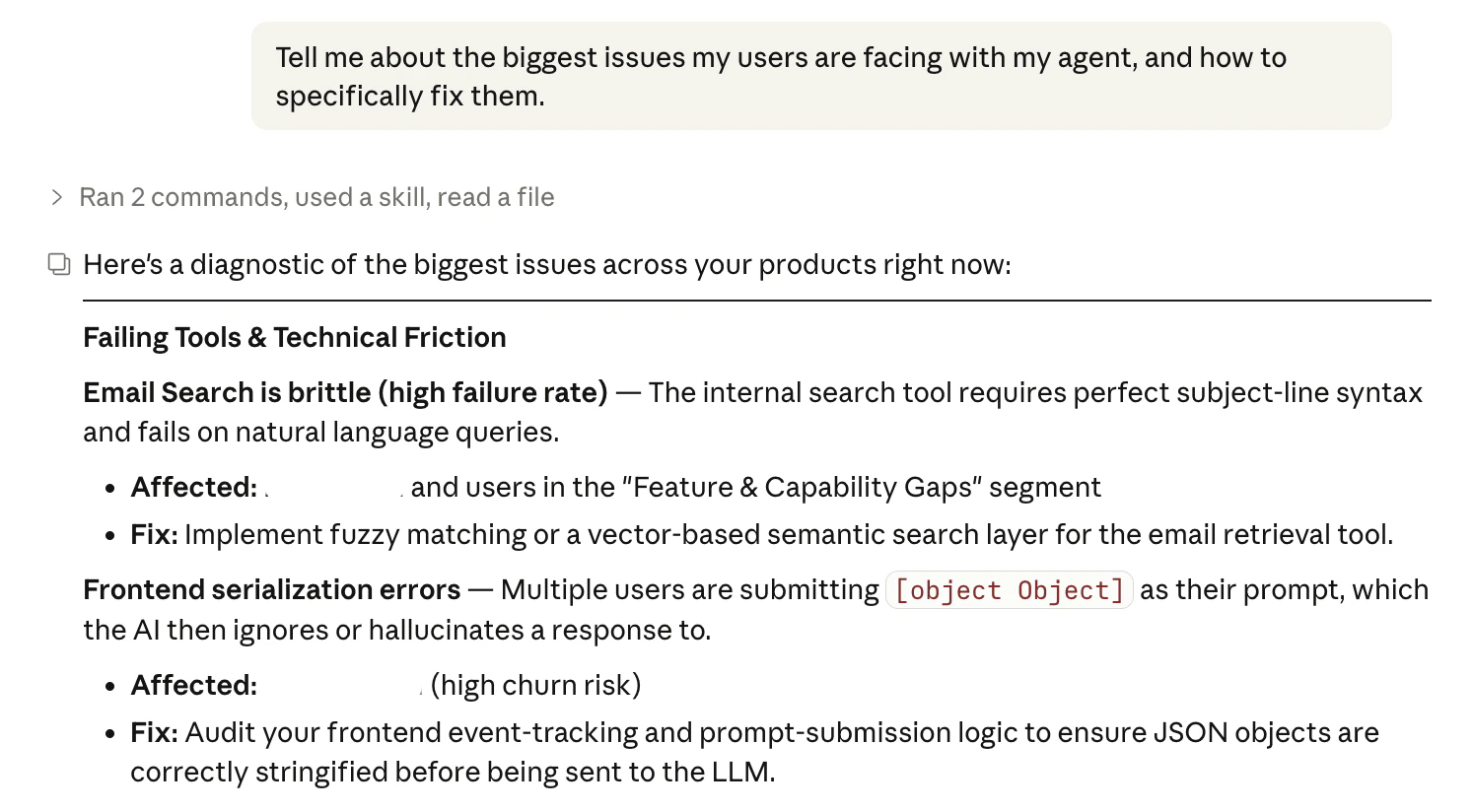
Surfaces failing tools, error rates, root causes, and affected users from real conversations. Then offers to fix the code directly — finds the file, suggests the edit, applies it on confirmation.
 ### Optimize prompts and models
```
/greenflash which prompt has the most hallucinations?
```
Compares prompt versions by quality index, hallucination rate, and user sentiment. Shows what changed between versions and recommends specific edits. Say "fix it" and the agent locates the prompt file and applies the change.
### Find struggling users
```
/greenflash who's churning this week?
```
Returns users with high frustration or struggle scores, grouped by segment. Drill into any user to see their full conversation history and understand what went wrong.
### Triage your inbox
```
/greenflash what's flagged?
```
Pulls your review inbox prioritized by severity — guardrail violations first, then safety issues, then low-quality interactions that need a human.
### Set up the SDK
```
/greenflash-onboard
```
Walks you through adding the Greenflash SDK to your project. Installs the package, creates the client, wires up conversation logging, identifies users — typically 5-6 lines of code. Supports both Python and TypeScript.
***
## Common Workflows
### "Something broke and I need to fix it now"
```
/greenflash what's broken?
```
The diagnostic skill surfaces the biggest problems across your products: failing tools, root causes, guardrail violations, dissatisfaction patterns. For each issue it shows who's affected and suggests a concrete fix.
When you're ready: *"Fix it."* The agent searches your codebase, finds the relevant file, and applies the change. It adds a `// greenflash:diagnose` comment at the fix site so future developers know the change was data-driven.
### "My VP wants a status update"
```
/greenflash give me a health overview of Customer Support Bot
```
Returns a product-level health summary: quality trends, anomaly detection, safety signals, sentiment shifts. If something looks off, follow up in the same conversation — the skill maintains context across turns.
### "I just deployed a new prompt and want to know if it's better"
```
/greenflash how is the support-v3 prompt performing compared to v2?
```
Compares versions by CQI, hallucination rate, user satisfaction, and topic distribution. If v3 is worse in some dimension, the skill tells you exactly where and recommends what to change.
### "I want to understand a specific user's experience"
```
/greenflash show me what's happening with user jane@acme.com
```
Returns the user's conversation history, quality scores, frustration signals, and segment membership. Useful for debugging a specific support ticket or understanding a churn event.
### "Set up Greenflash in a new project"
```
/greenflash-onboard
```
The unified onboarding skill auto-detects your codebase (Python or TypeScript), installs the SDK, creates a client, and wires up conversation logging. Follow-up skills handle prompt tracking (`/greenflash-onboard-prompts`), business events (`/greenflash-onboard-events`), and agentic message types (`/greenflash-onboard-agentic`).
***
## How It Works
1. **You ask a question** in natural language — or invoke a specific sub-skill directly.
2. **The router classifies your intent** and delegates to the right workflow (health, inbox, users, prompts, diagnostics, or onboarding).
3. **The skill calls the Greenflash Chat API**, which runs a multi-step investigation using your real conversation data.
4. **Results stream back** with progress indicators, then a final answer with evidence.
5. **Follow-ups reuse the same conversation**, so you can drill deeper without re-explaining context.
6. **When a fix is identified**, the skill can search your codebase and apply the change directly — with your confirmation.
***
## All Skills
### Analytics & Diagnostics
| Skill | What it does |
| --------------------- | ---------------------------------------------------------------------------------- |
| `greenflash` | Entry point — classifies your question and routes to the right workflow |
| `greenflash-health` | Quality trends, anomalies, safety issues, and sentiment across products |
| `greenflash-inbox` | Triage flagged conversations, prioritized by severity |
| `greenflash-users` | User behavior, segments, cohorts, and individual lookups |
| `greenflash-prompts` | Prompt and model quality, optimization recommendations, and direct fixes |
| `greenflash-diagnose` | Root cause analysis for failing tools, friction patterns, and guardrail violations |
### SDK Integration
| Skill | What it does |
| ---------------------------- | --------------------------------------------------------------------------- |
| `greenflash-onboard-unified` | One-command setup — auto-detects your codebase and walks through everything |
| `greenflash-onboard` | Core SDK integration (Python & TypeScript) |
| `greenflash-onboard-prompts` | System prompt logging for versioning and optimization |
| `greenflash-onboard-agentic` | Tool calls, reasoning traces, and agent workflow logging |
| `greenflash-onboard-events` | Business event tracking — link conversations to outcomes |
| `greenflash-verify` | Verify your integration is working: API key, SDK, client, and data flow |
***
## Configuration
The skill resolves your API key in this order:
1. `$GREENFLASH_API_KEY` environment variable
2. `.greenflash` file in the project root
3. Interactive prompt (key is saved to `.greenflash` for future runs)
The `.greenflash` file is automatically added to `.gitignore` to prevent accidental commits.
For local development, set `GREENFLASH_API_URL` to point at your local API instance.
Analytics and Chat endpoints require a **Growth plan or higher**. Data and lookup endpoints work on all plans. [Upgrade here](https://www.greenflash.ai/app/settings/billing) if needed.
***
## Next Steps
Source code, issues, and contribution guide.
Access Greenflash data programmatically.
Get your first insight in under 5 minutes.
Turn business questions into always-on checks.
### Optimize prompts and models
```
/greenflash which prompt has the most hallucinations?
```
Compares prompt versions by quality index, hallucination rate, and user sentiment. Shows what changed between versions and recommends specific edits. Say "fix it" and the agent locates the prompt file and applies the change.
### Find struggling users
```
/greenflash who's churning this week?
```
Returns users with high frustration or struggle scores, grouped by segment. Drill into any user to see their full conversation history and understand what went wrong.
### Triage your inbox
```
/greenflash what's flagged?
```
Pulls your review inbox prioritized by severity — guardrail violations first, then safety issues, then low-quality interactions that need a human.
### Set up the SDK
```
/greenflash-onboard
```
Walks you through adding the Greenflash SDK to your project. Installs the package, creates the client, wires up conversation logging, identifies users — typically 5-6 lines of code. Supports both Python and TypeScript.
***
## Common Workflows
### "Something broke and I need to fix it now"
```
/greenflash what's broken?
```
The diagnostic skill surfaces the biggest problems across your products: failing tools, root causes, guardrail violations, dissatisfaction patterns. For each issue it shows who's affected and suggests a concrete fix.
When you're ready: *"Fix it."* The agent searches your codebase, finds the relevant file, and applies the change. It adds a `// greenflash:diagnose` comment at the fix site so future developers know the change was data-driven.
### "My VP wants a status update"
```
/greenflash give me a health overview of Customer Support Bot
```
Returns a product-level health summary: quality trends, anomaly detection, safety signals, sentiment shifts. If something looks off, follow up in the same conversation — the skill maintains context across turns.
### "I just deployed a new prompt and want to know if it's better"
```
/greenflash how is the support-v3 prompt performing compared to v2?
```
Compares versions by CQI, hallucination rate, user satisfaction, and topic distribution. If v3 is worse in some dimension, the skill tells you exactly where and recommends what to change.
### "I want to understand a specific user's experience"
```
/greenflash show me what's happening with user jane@acme.com
```
Returns the user's conversation history, quality scores, frustration signals, and segment membership. Useful for debugging a specific support ticket or understanding a churn event.
### "Set up Greenflash in a new project"
```
/greenflash-onboard
```
The unified onboarding skill auto-detects your codebase (Python or TypeScript), installs the SDK, creates a client, and wires up conversation logging. Follow-up skills handle prompt tracking (`/greenflash-onboard-prompts`), business events (`/greenflash-onboard-events`), and agentic message types (`/greenflash-onboard-agentic`).
***
## How It Works
1. **You ask a question** in natural language — or invoke a specific sub-skill directly.
2. **The router classifies your intent** and delegates to the right workflow (health, inbox, users, prompts, diagnostics, or onboarding).
3. **The skill calls the Greenflash Chat API**, which runs a multi-step investigation using your real conversation data.
4. **Results stream back** with progress indicators, then a final answer with evidence.
5. **Follow-ups reuse the same conversation**, so you can drill deeper without re-explaining context.
6. **When a fix is identified**, the skill can search your codebase and apply the change directly — with your confirmation.
***
## All Skills
### Analytics & Diagnostics
| Skill | What it does |
| --------------------- | ---------------------------------------------------------------------------------- |
| `greenflash` | Entry point — classifies your question and routes to the right workflow |
| `greenflash-health` | Quality trends, anomalies, safety issues, and sentiment across products |
| `greenflash-inbox` | Triage flagged conversations, prioritized by severity |
| `greenflash-users` | User behavior, segments, cohorts, and individual lookups |
| `greenflash-prompts` | Prompt and model quality, optimization recommendations, and direct fixes |
| `greenflash-diagnose` | Root cause analysis for failing tools, friction patterns, and guardrail violations |
### SDK Integration
| Skill | What it does |
| ---------------------------- | --------------------------------------------------------------------------- |
| `greenflash-onboard-unified` | One-command setup — auto-detects your codebase and walks through everything |
| `greenflash-onboard` | Core SDK integration (Python & TypeScript) |
| `greenflash-onboard-prompts` | System prompt logging for versioning and optimization |
| `greenflash-onboard-agentic` | Tool calls, reasoning traces, and agent workflow logging |
| `greenflash-onboard-events` | Business event tracking — link conversations to outcomes |
| `greenflash-verify` | Verify your integration is working: API key, SDK, client, and data flow |
***
## Configuration
The skill resolves your API key in this order:
1. `$GREENFLASH_API_KEY` environment variable
2. `.greenflash` file in the project root
3. Interactive prompt (key is saved to `.greenflash` for future runs)
The `.greenflash` file is automatically added to `.gitignore` to prevent accidental commits.
For local development, set `GREENFLASH_API_URL` to point at your local API instance.
Analytics and Chat endpoints require a **Growth plan or higher**. Data and lookup endpoints work on all plans. [Upgrade here](https://www.greenflash.ai/app/settings/billing) if needed.
***
## Next Steps
Source code, issues, and contribution guide.
Access Greenflash data programmatically.
Get your first insight in under 5 minutes.
Turn business questions into always-on checks.